 OpenStreetMap

46.8220444,-71.2470919
Users' Diaries
Recent diary entries

For the rest of the year I will be working on railways. I will use references from various sources to verify my work.
Start AUG 20 2022
End DEC 31 2022
Sponsored By: None this time.

Lights
First encounters
After mapping street lights and poles and then Seamark lights I looked deeper into how to map light mostly light that is made my man and is in a consistent location. The addition of mapping lighting in Street Complete made this question greater with a tag like lit=yes this is great and all but not very descriptive if talking about a street or a way that may have puddles of lights at each street light.
Beyond
This has taken me to the point of looking at adding night lighting to the tops of power poles or rotating beacons on top of airport towers. These sorts of things could be found it mapping seamarks but for the most part is not appropriate for Open Sea Map. This is the line between it exists and there is a standard to make the light show and to add the correct tags to describe its sequence of flashing but it is not a seamark light but there is overlap between. There are power pole or tower lights that do show on nautical charts.
Thoughts and reflection
Are we mapping with enough detail, is it easy for a first time mapper to contribute, and are we mapping for the renderer? Anything I missed below?
Lit:
Highway:
flashing_lights=* highway=traffic_signals crossing=* highway=street_lamp
Railway:
railway=level_crossing railway=signal
Man_made:
Seamark: osm.wiki/Seamarks/Lights osm.wiki/Seamarks/INT-1_Section_P
Complicated Light mapping. osm.wiki/Seamarks/Sectored_and_Directional_Lights
Aviation: osm.wiki/Proposed_features/Aviation_Obstacle_Light

I have been tracking down some properties owned and managed by the University of Michigan, Michigan State University and Michigan Technological Univeristy. These include university properties managed as farms, forests, nature reserves, and field-based teaching. Many are open to the public, so this allows greater access to recreational opportunities by having these added and available in OSM.
Other efforts have been to map properties owned by the Nature Conservancy and other land trusts that are open to the public. County Forests, parks, and other local owned public properties are important in my view as well. The MapRoulette challenge for Michigan GNIS nodes by user BBMiller has been a useful tool to focus on those features, particularly the emphasis on adding the GNIS:feature_id identifier which will assist with Wikidata and Wikipedia integration.
I was inspired to create my own MapRoulette Challenge for Michigan GNIS stream and canal points to add the GNIS identifer where missing, as well as build in potential for future automated editingn tools to improve connectivity to wikidata, and just plain add in named rivers, streams, and drains that are missing from OSM, incomplete, or need their ways to be collected into relations.
Upcoming, i am thinking of making another MapRoulette challenge for the midpoints of roads on the Ottawa National Forest- most of those seem to be missing so that would be an opportunity to focus on digitizing and adding those in a high quality level from USGS 3DEP/aerial imagery rather than directly importing.
Just been a lot of fun working on Michigan things and figuring out some routes to improve OSM. See you in the changesets!

It has been the 435 days since the start of my OSM days, don’t remember why I started, I just did. It started small with adding minor businesses and fixing road names, then I mapped out large chunks of landuse at a time around my hometown. eventually, this evolved into an ongoing (though slowly moving) project across the Central-Eastern part of Connecticut. Then recently I got involved with the OSM Discord server for guidance. Also recently I began #NoteFreeCT like #CloseTheNotes but we (I) focus on Connecticut as a whole, also started a little micro mapping as well, hopefully all this doesn’t get too out of control.
Until next time, Jmapper007
P.S. next time most likely won’t be any time soon.
.
..
Posted by CharliePlett on 16 August 2022 in English.

The Problem
In order to do beautiful micro-mapping it is necessary to map ways with a lot of nodes. However, it is painful for other mappers to connect their own adjacent ways to these nodes.
Possible Solutions
-
Some mappers have suggested using multi-polygons to cut those ways and attach multi-polygons. But I have a personal problem with this which stems from the fact that a lot of beginners have a hard time understanding the concept of multi-polygons and how to use them.
-
Another solution is to remove the way entirely. However, this also removes the history of that item, which I’m averse to.
The Main Culprit
The #ADT Apple Data Team has been multiplying nodes on coastlines and waterways all over Central America. Here are some examples:
Changeset in Belize by DaleOfAire

The State of the Map 2022 (SotM) international conference will start in a few days. It will be the first in-person conference after the Covid19 pandemic started and thanks to the SotM volunteers, it will be a hybrid event.
While participating in SotM can be exciting for community members, it can also be stressful for introverts or people who plan to attend but want to minimise their social interactions due to Covid. Additionally, there are people who would like to approach others to talk to them, but may feel apprehensive doing so.
Trying to help with the above, this year I will bring some coloured communication pin-back buttons that community members can get and wear during the conference. The aim is to facilitate participants’ communication by making it easier to show if you want other people to talk to you at a given time or not.
What coloured communication pin-back buttons you can get at State of the Map 2022
The idea is that participants can wear a different button based on their communication preferences at the time. Showing a
- green pin-back button: the person is actively seeking communication and wants to be approached by people interested in talking.
- yellow pin-back button: the person wants to be approached by people they had discussions before. The person may approach other people to talk (if they wear an appropriate button or none at all), and that is ok.
- red pin-back button: the person probably does not want to talk to anyone or just to selected people. The person may approach other people to talk (if they wear an appropriate button or none at all), and that is ok.
If someone talks to you even if your button indicates that they shouldn’t, please keep in mind that they might not know about these buttons.
I started this to try and find my f150 that was stolen from me

Since I started https://opencampingmap.org I do a lot of campsite-mapping.
Doing that I quickly realized, that just using capacity is ambiguous when used for campsites. Thus I just ignore it on my map and show it as a bug if used.
While there is often a limit on persons in backcountry campsites, tourist sites tend to have a limit regarding the number of tents or caravans!
So how to map? Well this is what I suggest to do:
- If the number of people allowed to use the site is limited tag capacity:persons appropriately.
- If the number of tents or caravans/RV is restricted use capacity:tents or capacity:caravans
- If the site has a fixed number of pitches and does not distinguish between using them with a tent or caravan/RV use capacity:pitches instead.
Posted by MapMapHooray on 14 August 2022 in English.
Open Camping Map (GitHub) is a useful little tool developed by @giggls that provides camp site information for when you want to travel.
We recently added integration with Mangrove Reviews. When selecting a camp site, the Mangrove API is queried to get reviews based on the geo: link. Checkout this pull request for a behind-the-scenes look on the code.
And here’s how it looks:
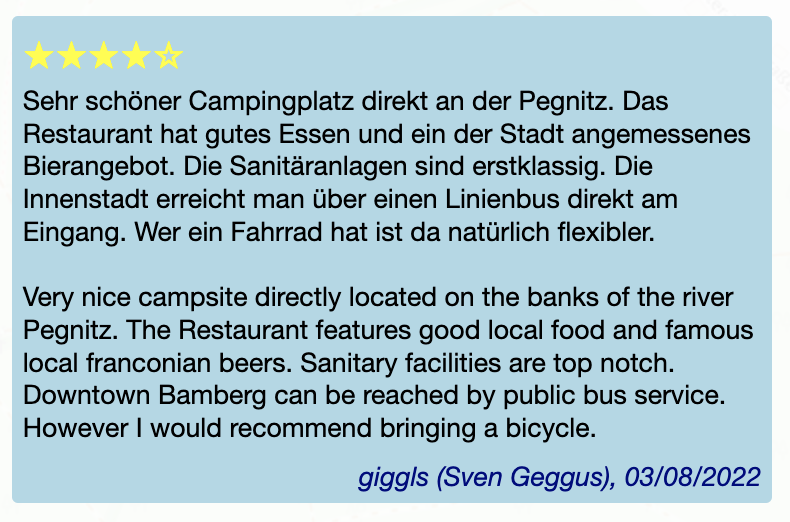
➡️ What do you think - is this useful? How do you feel about reviews in general? And: Which (FOSS) apps/websites do you use for camping?

I know, Florence is too far away, and tickets are worth a fortune. I hesitated for weeks before shelling out 800 € for a flight and a hotel. That’s too much even for me, so I totally understand if you could not make it this year.
Thank gods for the Internet though! We are continuing with an option of virtual participation in SotM. Traditionally that have meant watching talks online and occasionally making people at the venue read your questions out loud. Not too fun when you have to concentrate on events happening thousands of kilometers away.
BUUUT this year we trying something different as well. First, passive participation: few people at the conference (or just me, we’ll see how it goes) would post photos and announcements and general impressions on everything going at and around the conference. It’s a way to get a glimpse at the experience of actually being there. I have done it in Russian for every SotM and FOSS4G and FOSDEM since 2016, and now I thought it might fit well into the virtual attendee package.
Also, active participation: record a video introduction of yourself and put it into the library of introductions. That way you can listen to people who attend the conference, either physically or virtually, and start a conversation with any of them. It is a magic tool that helps learn something about a person before approaching them: might help when you have an introvert’s anxiety (I should know!). And generally it’s fun: it highlights that a conference is not so much about talks and dinners, but about people first and foremost.
So, do buy a Venueless ticket at https://pretix.eu/osmf/SotM2022/ and join us: yes, you won’t be able to shake any hands or split a beer, but with a very little effort you can be a part of the conference.

Pagina del diario di prova


Back in March I was amused to see Amanda tweet that the UK OpenStreetMap community ran a solar power mapping project “several years ago”. This was the theme of the [quarterly project(osm.wiki/UK_2019_Q3_Project:_Solar_Power) in Q3 2019, but the project keeps trucking on.
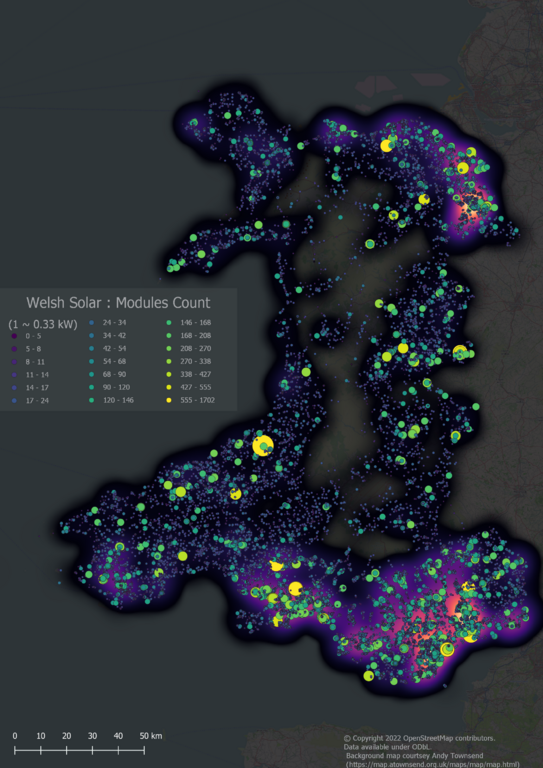
All small-scale Solar Power in Wales (i.e., excluding solar farms of more than 1MW capacity)
In the past few days we reached a milestone of having comprehensive solar cover for Wales, one of the constituent countries of the United Kingdom. I think this is the first country to have solar power mapped at such a fine level of detail either on OSM or anywhere else.
The rest of this post discusses aspects of the how & why of this work.
Solar Mapping in the UK
Thanks and please help

Dear all,
Today, v5.6.1 of the OpenStreetMap Carto stylesheet (the default stylesheet on the OSM website) has been released. Once changes are deployed on the openstreetmap.org it will take couple of days before all tiles show the new rendering.
Changes include
- Fixing rendering of water bodies on zooms 0 to 4
Thanks to all the contributors for this release.
For a full list of commits, see https://github.com/gravitystorm/openstreetmap-carto/compare/v5.6.0…v5.6.1
As always, we welcome any bug reports at https://github.com/gravitystorm/openstreetmap-carto/issues

I’m adding missing building with RapiD in Irvine, California:
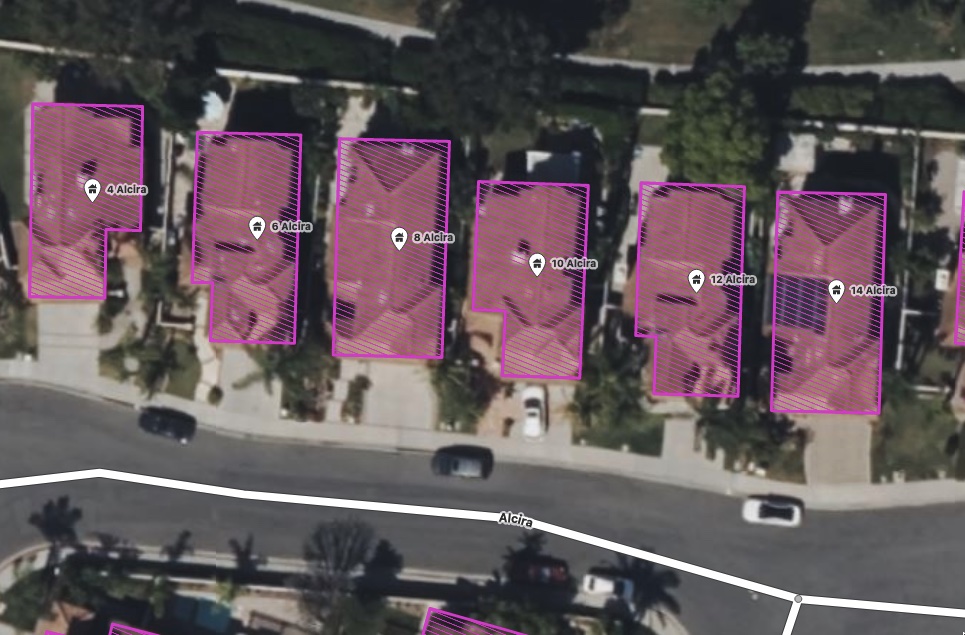
As you can see, there’s existing nodes tagged with building=yes and address info, imported at some point from city data it looks like:
Posted by pguillot on 11 August 2022 in French (Français).
Ma méthode pour mettre à jour le cadastre FR sous JOSM
Certainement pas la meilleure méthode, mais permet de mettre à jour efficacement un cadastre avec les derniers bâtiments.
Utilisation de JOSM.
Installer le coloriage “cadastre”
Télécharger le rendu CSS que j’utilise via cette URL : https://data.tedomum.net/s/GWcAyNHWjP3oSA9
Ce rendu CSS permet de colorier en rouge tous les polygones qui ont un attribut “source” contenant le texte “cadastre-dgi-fr source : Direction Générale des Finances Publiques - Cadastre. Mise à jour : XXXX”, où XXXX correspond à l’année (pour l’instant jusqu’en 2020). Pensez à le télécharger et le déposer dans son répertoire final avant de l’intégrer à JOSM.
Ouvez JOSM, puis rendez-vous dans le menu “Éditions / Préférences” puis cliquez sur la rubrique “Coloriage”, cliquez sur le “+” à gauche pour créer un nouveau coloriage :
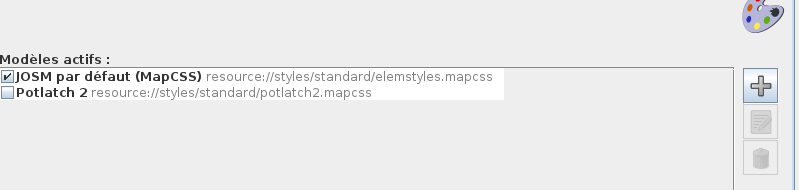
Allez chercher votre fichier puis donner un nom à ce coloriage :