OpenStreetMap
rphyrin's Comments
| Post | When | Comment |
|---|---|---|
| HOT Validation | Well, it seems that I have been a type 3 validator since the beginning. At first, I wanted to be type 2, but I didn’t have the means to properly show other mappers where the errors that needed fixing were located (i wish we had this kind of feature built directly into the Tasking Manager). Before such a feature exists – for the sake of “developing mapping skills” – I think it is better for now to communicate that feedback outside the OSM/Tasking Manager platform instead of rejecting tasks one by one. At first, I wanted to be type 2, but it actually resulted in the project stalling, as other mappers left and never returned. Regarding the idea of “improving mapping skills in others,” some people simply do not see mapping as a valuable skill in the first place, and this might be the last time they ever participate in a mapathon. There is also probably a type 0 validator who rejects tasks purely for the sake of “stealing” someone else’s points, usually in the context of gamified mapathon scenarios (especially when those points directly correlate with monetary rewards). |
|
| MapSwipe Today and it’s future in OSM talk at SoTM US 2025 / SoTM EU 2025 | What if all those 3+ validated attributes were stored on the MapSwipe server, separately from the OSM database? OpenStreetMap US has already experimented with this kind of approach through its “public domain map” initiative. |
|
| Viewing infrared imagery for any place on Earth (tutorial) | Thank you for the script. I tried it myself, and it looks pretty cool. I’ve never actually coded a script to manipulate raw satellite imagery before. (In the past, I experimented with Google Earth Engine, but I didn’t really understand how to manipulate the raw data through scripting) Now I see some interesting colors, but I don’t yet know how to interpret them. So I consulted ChatGPT. It explained that red indicates healthy vegetation (which reflects strongly in near-infrared); bare soil or built-up areas appear bluish or cyan (since they reflect more in the red and green bands than in near-infrared);
and water usually shows up dark (low reflectance in all bands).
In some cases, there are exceptions, such as clouds, which appear as very bright white (reflecting all bands) with dark patches nearby, caused by the cloud’s shadow.
|
|
| mbtiles, mbtileserver, tileserver-gl | Thank you for the pointer |
|
| mbtiles, mbtileserver, tileserver-gl | Yes, for my daily online activities (writing, coding, browsing), I only have this one Windows laptop. So when I do web development, I usually handle both development and testing in my Windows environment before deploying to a Linux-based server (or maybe I should really consider setting up a Linux dual boot for a better development environment in the future). I’ve been curious for a long time about how to serve my own tile server using the openstreetmap-carto stylesheet. In the past, I’ve successfully set up several vector tile servers using other stylesheets, but I still don’t know how to use the openstreetmap-carto itself (the other currently available vector stylesheets still don’t satisfy me for some reason, and I really like osm-carto 😂). What I really want to build is something similar to the slippy map on the osm.kr homepage : a raster tile server (using openstreetmap-carto style) showing only a limited region, with some local modifications to the osm-carto rendering (i heard somewhere that tiles.osm.kr excludes military bases to comply with local regulations, something like that). I read the openstreetmap-carto installation guide, but it seems to be intended for someone who wants to process data for the entire planet. I wonder if there’s a simpler way to do this instead. And finally, this article I read recently gave me some hope : gather the MBTiles and serve them via TileServer-GL (or mbtileserver). That’s the kind of simplicity I’ve been looking for for a long time 😂. |
|
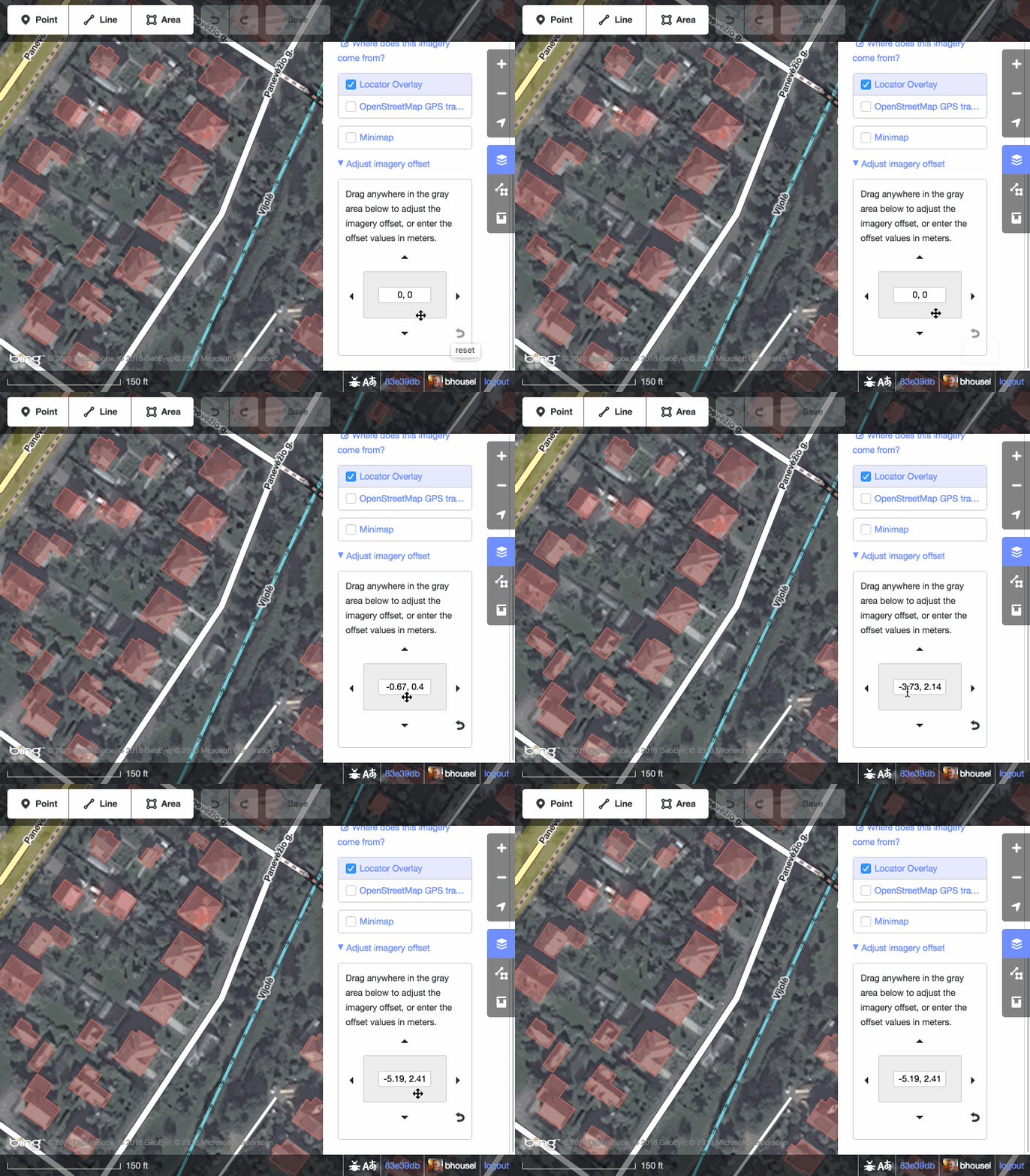
| New Esri World Imagery | @TonyJC Have you tried the “Imagery Offset” feature in the iD editor?
|
|
| New Esri World Imagery | Is there a new Esri World Imagery update? Did they announce it somewhere? |
|
| Skyranger 35 + OpenStreetMap Carto | Found it… Fulberg & Ochsenbodenstrasse (Unteriberg, Schwyz, Switzerland) |
|
| Skyranger 35 + OpenStreetMap Carto | Video link with timestamp : https://www.youtube.com/watch?v=orbzTpqlBok&t=35s I wonder if anyone can locate the actual location shown on that map using an advanced Overpass query. (I see bridges, rivers, roads, and peaks in the image. Can we create an Overpass query to check for all locations that contain these features nearby?) |
|
| The Take Off: LCCWG Sub-committee for OSMF Affiliation Models | The research team has drafted a report page here : osm.wiki/User:Rphyrin/LCCWG |
|
| OSM Progress timelapse videos with QGIS and Ohsome API | Really cool. I wonder if you could export and share those OSMCarto-like QGIS symbology settings so we can skip the time-consuming setup and benefit from your hard work instead 😂 |
|
| Please stop guessing about highway/waterway crossings | I wonder if there is even a surefire solution to fix the inherent problems that any ‘anyone can edit’ collaborative project (like this one) faces. Not everyone has enough resources to defend every inch of the content, whether against prank vandals or a very persistent good-faith editor (who was misled and actually caused significant damage to the project). The back-and-forth edit warring is exhausting and feels pointless. Also, not everyone has the mental stamina to prolong the conflict by reporting it to the available higher authority. Or maybe we could look up to more mature projects out there (like Wikipedia). Over time, they made the project less and less inclusive (only the trusted elites have the privilege to edit the content), all for the sake of quality assurance. |