 OpenStreetMap

Just a musing on a tasking manager software, but for field data instead of tracing.
With the amount of data we are expecting to come back from the Soputh Kivu mapping, we need better tools and processes for getting it into OSM
If this rings bells with anyone, please feel free to get in touch…
Field data tasking manager concept
The need:
So far Missing Maps field data editing and uploading is fairly randomly done, using a combination of wiki pages, data in dropbox folders, scanned field papers.
On a small scale, this can be effective (and has been). However, as we start to get more and more data back from the field, and as field data becomes a normal part of mapathons / armchair mapping, this model doesn’t scale well.
It relies far too much on the person managing the project being present to explain the data and the system for uploading it. It also relies on individuals to carefully document how much of the data they took responsibility for they actually edited / uploaded.
The / One solution:
The HOT tasking manager is a great example of how software can solve problems in a crowdsourcing / microtasking environment. Whilst there is always room for improvement, its fundamental raison d’etre means that large tasks can be worked on collaboratively by many individuals at the same time.
One solution to the scaling of editing of field data is a task manager for field data that chunks up geographical areas and then presents data relevant to that area, whilst providing instructions on purpose and process.
What would this look like?
The user signs in and elects a task. The task displays with instructions and purpose. The user chooses a square from a grid. The TM displays the types of data availabkle in that square. The user then confirms their choice and locks it or chooses an alternative square.
One the square is confirmed the current OSM data for that area is displayed on the screen.
Also displayed are the types of data that are available for that square (this could be gpx, odk shapes, field papers, OpenMapKit). The user chooses the data type and it displays as a layer. The user then begins to add the data that he/she has been instructed to add.
If the user finds the object to be added (ie a building) is already in the OSM data set, he/she adds the relevant tags and saves. If the building does not exist already, the user uses imagery to try to locate it. If successful he/she adds the object and tags and saves. If the object still cannot be found, the user flags the object for further investigation, filling out a short comment. This comment is then communicated to the manager of that task.
If the user finds/creates the object but has problems tagging, s/he flags the object for further investigation, filling out a short comment. This comment is then communicated to the manager of that task.
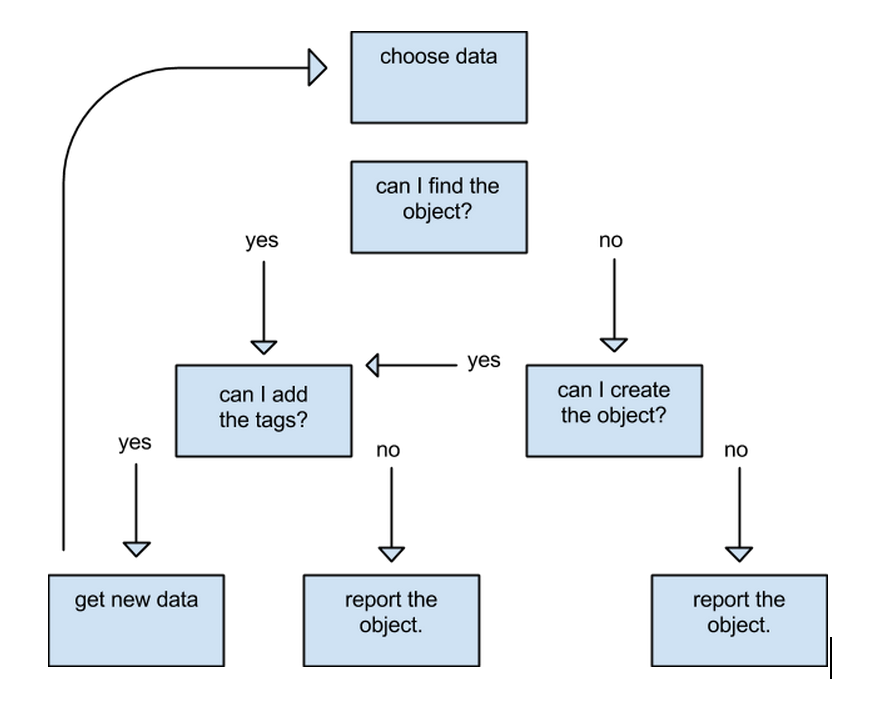
If the user finishes editing / uploading a particular data set (eg gpx), then s/he can mark this as done. Then, the user can either move on to a different set of data or unlock the square. If s/he finishes all the data for the square, then s/he marks the square done. If the user finishes their session without completing a data set, they unlock and add a comment.





Discussion
Comment from sfixowany on 15 June 2015 at 12:59
works well thx
Comment from DaCor on 15 June 2015 at 17:07
What you outline is like a cross between Field Papers and Mapcraft with the best of both (and something else) mixed in
Thats the high level overview, buts its definetly possible to do what you are talking about using tools like that. Adding links to other sources, as you mentioned, is also easy to do.
Comment from pedrito1414 on 16 June 2015 at 10:53
Thanks for the feedback, Dave!
Comment from dkunce on 18 June 2015 at 16:19
Pete, This looks super awesome and exactly what we need for our remote/offline workflow. We should add this into the upcoming field papers discussion.