 OpenStreetMap

partially undelete changesets
Posted by malenki on 26 December 2014 in English. Last updated on 18 November 2015.A note to self but may also be helpful for other mappers.
Edit: The newer easy undelete of several ways may prove faster results with less work.
Recently I had to undelete a lot of stuff. I used JOSM with enabled remote control, the Plugins todo and reverter on Linux and established this workflow:
-
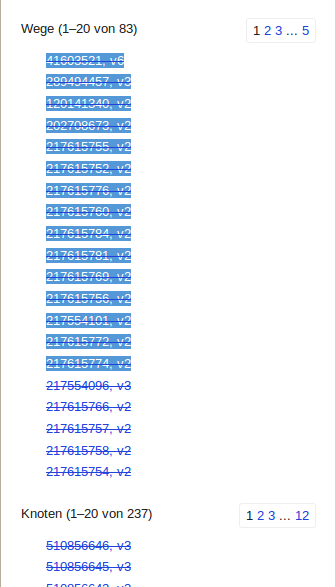
Find a changeset which looks a bit fishy. For example if the user seems quite inexperienced (short time OSM member, small amount of changesets) and has a lot of deleted objects on a changeset this seems worth a second look. Example-Changeset, deleted objects are shown like this¹:
-
Revert that changeset locally in JOSM using the revert plugin: press ctrl-t, enter the changeset number and click “revert”
Since we don’t want to revert the whole changeset – maybe there are some useful edits in it, too – we need to take some extra steps:
- While JOSM is reverting which may need some time copy all the deleted ways from the changeset page into a file named w and remove all white spaces. Do the same for deleted nodes with a file n.
-
Select all deleted ways using the remote control by running this command on a CLI:
**wget -q http://localhost:8111/load_object?objects=$(for i in $(less file_named_w); do echo w”$i” cut -d , -f1; done tr “\n” “,” sed ‘s/.$//’) -O -** - Add these ways to the todo list
-
Look at them one by one. You may also create a new data layer and have a look what the data of the place now looks like. You can also load the data in the layer with the reverted changeset which shows you how it will look after uploading but maybe confuses a little when loading too much data.
-
If undeleting the way would enhance the quality of OSM, add the tag tmp=keep to the way.
-
After going through all the ways take care for the nodes and select them like the ways before:
**wget -q http://localhost:8111/load_object?objects=$(for i in $(less file_named_n); do echo n”$i” cut -d , -f1; done tr “\n” “,” sed ‘s/.$//’) -O -**
Since do only want to look at more valuable nodes (with tags on them) we drop all the others from the selection by using the JOSM search:
- press ctrl-f
- select “remove from selection”
-
query for type:node untagged
-
Add them to the todo list and check if they are worth keeping as you did with the ways.
-
Upload the selected data:
- Search for “tmp=keep”
- remove “tmp=keep”
-
do “Upload Selection” (or press ctrl-alt-shift-u)
- Optional: let the changeset remain open, download the region where you uploaded the undeletions, check for errors, fix them and upload. Close the Changeset with ctrl-alt-Q.
I am aware that there are more sophisticated ways to achieve what I did using the workflow above. I’d be glad if you would share them. :)
¹ As for now the markdown implementation is not able to show a strike through so I have to stick with a screenshot.





Discussion