 OpenStreetMap

A Shortbread map style that looks a bit less beige
Posted by SomeoneElse on 20 November 2025 in English. Last updated on 30 November 2025.
The https://www.openstreetmap.org website currently has two “OSM-hosted” map styles on it - the “Standard” style (raster tiles) and a “Shortbread” one. The schema for “Shortbread” is here, and the display style shown is “Colorful” from Versatiles. It looks like this:
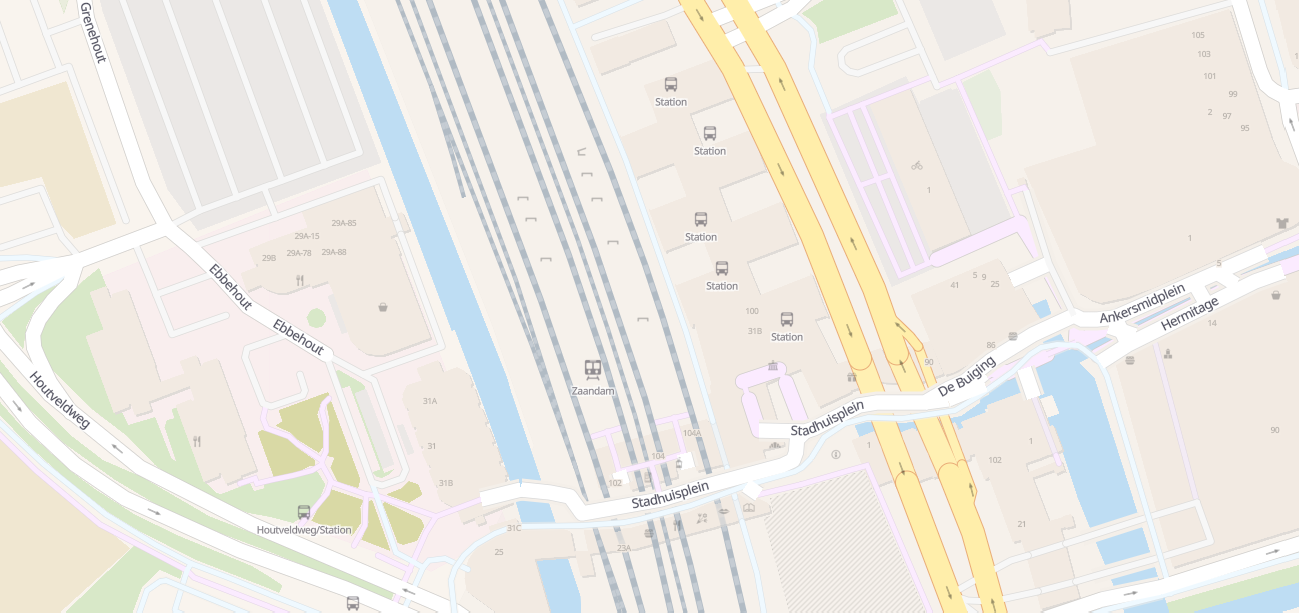
That’s … less informative than it could be. Most of those points of interest have names, which aren’t shown, and small grey icons on beige isn’t especially doesn’t help. Instead, let’s try a different one (see the picture at the top).
Immediately, footpaths, shop names and even restaurant cuisines are now visible. See that here and try moving around.
So how to install that on a server?
The map style is using OSMF’s shortbread-schema vector tiles, but the style itself consists of a few flat files that can be installed on pretty much any web server.
Here’s what it took to install on a brand-new server. My test examples was running “Debian 12” and I’ll install Apache for a web server, bit it’s certainly possible to use something else instead. To get started:
sudo apt install git apache2
From a non-root user that I’ll refer to as “youruserid”, we’ll create a “src” directory if it does not already exist, and get a couple of projects there:
mkdir ~/src
cd ~/src
git clone https://github.com/SomeoneElseOSM/SomeoneElse-vector-web-display
git clone https://github.com/systemed/tilemaker
“SomeoneElse-vector-web-display” contains the management scripts that are used to deploy a web page for external consumption as well as the actual style definition itself, and the only thing that we need from “tilemaker” are the font files.
Apache’s web root on Debian is typically /var/www/html/; we’ll create a directory below there to deploy in to:
sudo mkdir /var/www/html/vector
That path is hardcoded in the deployment script below but you can change it if necessary. We’ll then run that deployment script
sudo /home/youruserid/src/SomeoneElse-vector-web-display/svwd_into_apache.sh NONE osmf_shortbread http://youripaddress /home/youruserid/src/SomeoneElse-vector-web-display/resources/svwd03_spec.json /home/youruserid/src/SomeoneElse-vector-web-display/resources/svwd03_metadata.json /home/youruserid/src/tilemaker/server/static/fonts /home/youruserid/src/SomeoneElse-vector-web-display/resources/svwd03_style.json /home/youruserid/src/SomeoneElse-vector-web-display/resources/svwd03_index.html svwd03sprite /home/youruserid/src/SomeoneElse-vector-web-display/resources
The references to /home/youruserid/src/ are just were we got the software earlier.
The parameter http://youripaddress describes exactly how will access the site. If you already have a site set up at (say) https://mydelightfulmap.com (with an https certificate for that address) then you’d use that in place of “http://youripaddress” above. Because all the scripts point to the same place, we don’t need to worry about CORS unless we actually have multiple names pointing at it.
The name “svwd03” is just the name of the map style - various sets of files with that name are copied from the source directory to the web server. The name “osmf_shortbread” is what we want to call it when we browse to it.
The output from that command will be something like:
youruserid@debian:~/src$ sudo /home/youruserid/src/SomeoneElse-vector-web-display/svwd_into_apache.sh NONE osmf_shortbread http://youripaddress /home/youruserid/src/SomeoneElse-vector-web-display/resources/svwd03_spec.json /home/youruserid/src/SomeoneElse-vector-web-display/resources/svwd03_metadata.json /home/youruserid/src/tilemaker/server/static/fonts /home/youruserid/src/SomeoneElse-vector-web-display/resources/svwd03_style.json /home/youruserid/src/SomeoneElse-vector-web-display/resources/svwd03_index.html svwd03sprite /home/youruserid/src/SomeoneElse-vector-web-display/resources
Created spec file:     /var/www/html/vector/spec_osmf_shortbread.json
Created metadata file: /var/www/html/vector/metadata_osmf_shortbread.json
Installed fonts into:  /var/www/html/vector
Created style json:    /var/www/html/vector/style_osmf_shortbread.json
Created web page:      /var/www/html/vector/index_osmf_shortbread.html
Access via:            http://youripaddress/vector/index_osmf_shortbread.html
[email protected] and [email protected] copied to /var/www/html/vector
svwd03sprite.png and svwd03sprite.json copied to /var/www/html/vector
No optional https://www.openstreetmap.org/user/3x sprite files created; /home/youruserid/src/SomeoneElse-vector-web-display/resources/[email protected] does not exist.
No optional https://www.openstreetmap.org/user/4x sprite files created; /home/youruserid/src/SomeoneElse-vector-web-display/resources/[email protected] does not exist.
As that suggests, we can just point a web browser at the URL on the “Access via” line to see a map. The resulting “index_osmf_shortbread.html” can of course be edited as desired, or incorporated into something else. In that, the call that sets up the map is:
map = new maplibregl.Map({
    container: 'map', // container id
    style: styleURL, // stylesheet location
    center: [ -1.5, 53 ], // starting position [lng, lat]
    hash: true,
    zoom: 8, // starting zoom
    maxZoom: 25,
    attributionControl: true
});
Changing the longitude and latitude of the centre of the map and the starting zoom level are straightforward.
For ease of debugging, there’s some debug code in the generated .html that is commented out by default. Set this to true to see vector tile boundaries:
https://wiki.openstreetmap.org/wiki/Tag:map.showTileBoundaries=false;
and uncomment this section to load the inspector:
map.addControl(new MaplibreInspect({
     showInspectMap: true,
     showInspectButton: false
}));
Next step, modifying the style
Watch this space …





Discussion
Comment from Zverik on 30 November 2025 at 12:18
Andy, this is an amazing work! I’m thinking of including it into Every Door as a plugin, because it’s so much easier to navigate.
One thing, I’ve found this weird uncased road: https://map.atownsend.org.uk/vector/index_svwd03.html#17.59/59.389977/24.717497
Comment from SomeoneElse on 30 November 2025 at 12:58
That’s a
https://wiki.openstreetmap.org/wiki/Tag:highway=living_streetnot in a residential area - I definitely need to look at that. I think all my examples were in residential areas, like https://map.atownsend.org.uk/vector/index_svwd03.html#17.59/54.551428/-1.904913 . The “draw living streets without casing” thing was supposed to be a way of distinguishing them from other streets, but obviously that does not work here.In the style that I used the cartography from I eventually changed that (see https://map.atownsend.org.uk/vector/index_svwd01.html#17.59/54.551428/-1.904913 ) so it should just be a case of merging that change into this style too.
Comment from SomeoneElse on 30 November 2025 at 18:53
@Zverik OK, fixed. https://map.atownsend.org.uk/vector/index_osmf_shortbread.html#17.59/59.389977/24.717497 looks more sensible now. There are a couple of other bugfixes that could do with merging into this style too; I’ll do that as time permits in the coming days.