 OpenStreetMap

OpenStreetMap NextGen Development Diary #20 — Sign-in & Sign-up v2.0
Posted by NorthCrab on 14 November 2024 in English.It’s time for yet another OpenStreetMap-NG development update! This week we’re excited to present completely redesigned authorization interfaces and new account connectivity features.
🔖 You can read other development diaries here:
@NorthCrab/diary/
⭐ This project is open-source — join us today:
https://github.com/openstreetmap-ng/openstreetmap-ng
🛈 This initiative is not affiliated with the OpenStreetMap Foundation.
📹 Video Summary
In this week’s video, I demonstrate the redesigned sign-in experience, showcase our reinvented sign-up page, and explore the connected accounts feature. As always, the recording includes chapter markers for easy navigation.
⬇ Click below to play ⬇
or click here: https://peertube.monicz.dev/w/fcKQXyH87zeKPWvscBeBq7
New Sign-in Experience
We’ve redesigned the sign-in experience to be more seamless and unobtrusive. The new popup-based interface allows you to authenticate from any page without losing context of what you were doing. Unlike the current implementation that redirects you away, the new system maintains your focus and workflow.
The sign-in interface will support passkeys and various two-factor authentication methods. We’ve also integrated support for external services authentication while maintaining a clean, focused design.
New Sign-up Page
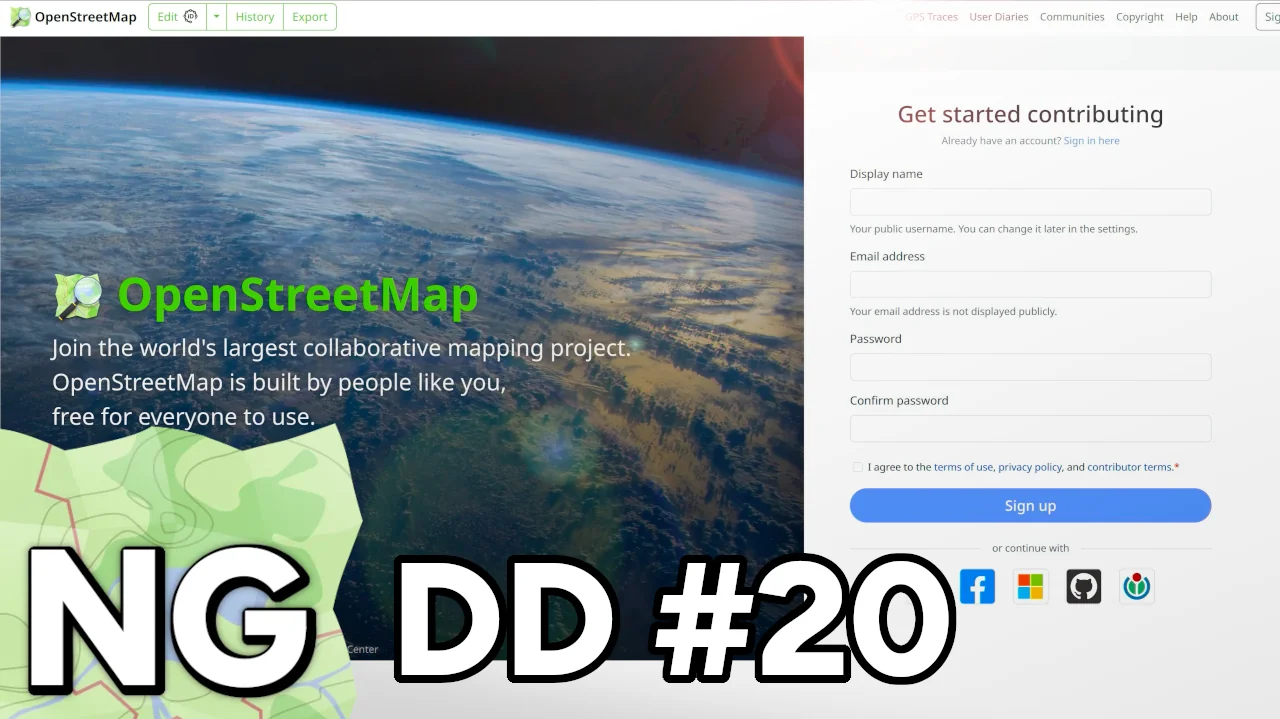
The sign-up page has received a complete visual overhaul, featuring a striking design that better reflects the project’s ambition. The left side showcases a bold Earth background - a fitting choice for a project dedicated to mapping the world - accompanied by the project logo and a welcoming introduction.
The right panel contains a streamlined registration form with improved layout and consistent color scheme. We’ve also added explicit terms of service acceptance through a checkbox, ensuring users are aware of their agreements. The redesign aims to present OpenStreetMap-NG as the serious, professional mapping platform it aspires to be.
Connected Accounts
We’ve introduced a new Connected Accounts feature, accessible through settings, that expands authentication flexibility. Unlike the current implementation that limits users to one external service, OpenStreetMap-NG allows connecting multiple services to your account.
A notable improvement is the renaming of the Wikipedia authentication option to Wikimedia, acknowledging that users can sign in with any Wikimedia project account (Wikipedia, Wikimedia Commons, etc.), not just Wikipedia specifically.
🌠 Sponsors
This update was sponsored by 16 amazing people.
8 donors on Liberapay, and 8 on GitHub Sponsors.
Thank you for your trust. — NC 🦀
- ~1847430
- gileri (Eric G.)
- mutipg
- RedAuburn (Harry Bond)
- ~1819511
- AurimasF (Aurimas Fišeras)
- starsep
- gander (Adam Gąsowski)
- owiecc (Szymon Bęczkowski)
- kkalata (Kamil Kalata)
- okainov (Oleg Kainov)
- sunsurfr
Early supporters of the project receive something special — the time-limited OpenStreetMap-NG Founder profile badge. This unique reward is only available during the development phase. Every donation, big or small, helps us write the next chapter of OpenStreetMap.





Discussion
Comment from starsep on 14 November 2024 at 22:49
Great work as always! Thanks, I really appreciate those short demo videos.
How do you handle user not accepting T&C etc.? I think that’s intended that the user doesn’t have a choice in the Ruby implementation. Prob since the license change
Regarding Wikipedia/Wikimedia I think you are correct but Wikipedia title and logo is much more recognizable. So it’s not that obvious which way is better. Putting both Wikipedia/Wikimedia would likely look messy
Comment from NorthCrab on 16 November 2024 at 04:31
It’s a browser required field, so the browser nudges the user to make a conscious decision of accepting the terms. This ensures they don’t accidentally miss the terms.
Comment from Hedaja on 19 November 2024 at 08:18
The floating login popup is really nice because you are not taken away from the page you are working on. The sing-up page looks good on such a big screen. But I am wondering what it would look like on a small screen especially on a mobile device.
Comment from NorthCrab on 19 November 2024 at 09:22
@Hedaja I am getting inspiration from https://kagi.com/signup (which has a great modern and minimal design), and you can expect a similar experience on OSM-NG mobile version 😃.