 OpenStreetMap

Multiuser mode
Now, you may go into the OSM-Data world and visit places ‘together with a friend’. As you move around, you will see your company next to you, also moving and watching. If you just start “OSM go”, your user name will be the name of your country. Or call www.osmgo.org?user=myName. Use a nickname or even better, use your OSM-name. A 2nd-click any place you want to visit and select the icon of “OSM go” to enter. Your friend may follwow you, using the slippy map (see below).
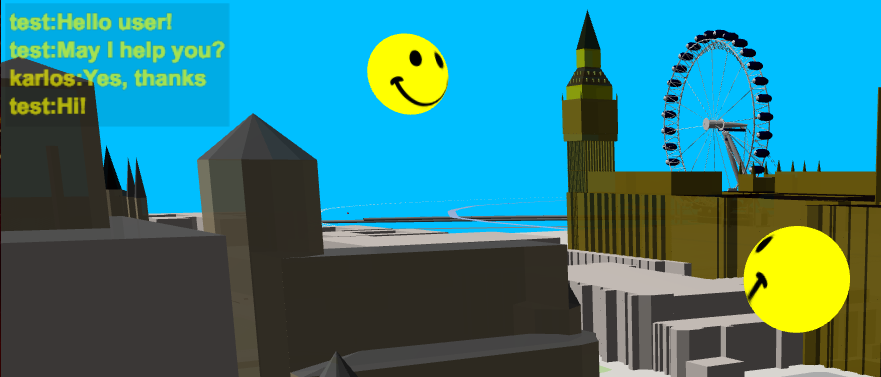
There is a ‘chat’ implemented in “OSM go”! Press key C and enter text in the popup dialog. The actual chat texts will be shown in the text box at the top left. There you will also see if an other user is dropping in or leaving. If you like to test it with me (-karlos-) just send me a time, I may be there and guide you. So don’t be afraid if you use “OSM go” and see a moving smile. Some visitors and me had already a lot of fun doing this. Some user of “OSM go” may have been shocking surprised, sorry.
Slippy map
The new slippy map is done with Leaflet. You will see it, as you call www.osmgo.org or if you press the key M while using “OSM go”.
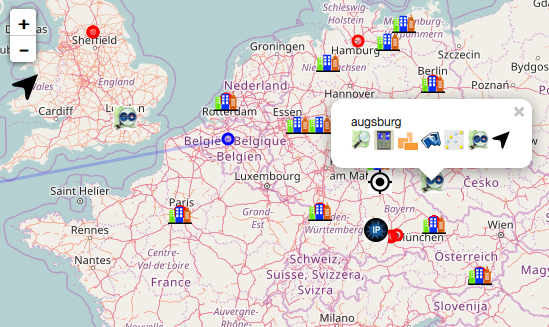
Usually, you will see the OSM default world map with additional layers:
- A number of city icons, you may mostly know as ‘Demo areas’ from the wiki page Simple 3D buildings. A klick at one of them will show the map menu. There you may select none of the existing 3D renders. The arrow at right will zoom in to the place or zoom out to the world map.
There are the usual map zoom controls, a search control to find a place on earth by text and a control to zoom to your actual location. The cursor keys, mouse- or touch-drag will slip the map. The keys plus/minus and the mouse weel will zoom. A double-click/-touch will zoom in, a single-click/-touch will zoom out. A 2nd-mouse-click at any place or a long touch will popup the map menu as descripted above.
With the menu top right you may activate some “OSM go” specific layers:
-
“OSM go” shows all users as an icon. Active users will be shown as a smily. A klick on one will show the map menu. If you zoom in by the arrow, you may even see the user move its actual position across the map. If you enter “OSM go” yourselves now, you will arrive next to your OSM-friend. If a user starts “OSM go” or gets passive, you will get an message by the map.
-
Layer “You” will get active, if you klick on the “location” control at bottom left. Your browser will ask you to use your actual location, show an icon and will zoom in to it. Also the location, determined by your IP address will be shown.
-
“Visits” will show a lot of red cycles: Places, other users did visit recently. Form the very last visit, the home of the visitor is shown in blue. Of course, a click on a cycle will bring the map menu to start a 3D renderer.
If you visit the map with an given user name (by adding ?user=myName to the URL) only the layers “OSM go” and “Visits” are active.
The map code/function isn’t final. It would be nice, if someone will help me using Leaflet accurate. Like: how to use the enter key for text search. As avatar I used an creepy human eye first, then a glass eye. There should be a way to select or even download an individual avatar, like the eye of 2001-HAL or whatever. ** ‘OSM go’ uses a lot of URL parameter. I would like to replace them by a map menu, but I don’t know how to do it - yet.
Outlook
- There is a lot of gaps to fill, like more roof shapes.
- There should be a 3rd person view with an avatar like in “Pokemon GO”.
- The primary intention, to make a “game” to help OSM is still present. In the last days, I played Pokemon to get inspirations. May be: Find new shops or changed places, take pictures to enable arm chair editing the tags of the places.
- I consider to recode “OSM go” in C++ (or Shift ) to have native applications - and use WebAssembly to run it in browsers.





Discussion