 OpenStreetMap

Fokus pada pemetaan desa Gadung. Berhemat sambil beraktivitas.
Users' Diaries
Recent diary entries
Posted by Zing929645 on 7 September 2022 in English.
Last updated on 19 September 2022.

Introduction to JOSM Route Visualization
Hi, this diary is for showing what I have done in GSoC 2022. Two months went so fast that I suddenly realize the final date has come. But I still want to follow the guidance and try something I haven't done before, and I can't wait to show the power of this plugin and some new functions that help.
JOSM route visualization plugin is for displaying the full picture of the public transport routes, which is convenient for users to query and greatly improves the efficiency of route maps and members modification.
Checking the relevant function, you can open the relation editor of some route or public transport objects , and then grasp a big picture of the distribution of routes by specially enhanced image instead of a list of way members. In the meanwhile, the path-finding algorithm and logic handling is great for users to choose the next way to extend existed routes from given options rather than add ways needed manually.
Previous Posts
First Half Summary
- Fix the problem that target route figure is under the layer of other irrelevant models.[merge_request1][merge_request2]
- Make the ways under the route relation of same type as the selected relation of route more evident and add waterway features.[merge_request2]
- Mark the selected stop in main window[merge_request3]
- Listing distance from next and previous stops and relation routes in the dropdown of clicked stop[merge_request4]
Second Half Summary
- Add turn restriction to guarantee path-finding logic to avoid ways it shouldn't be turning to. [merge_request5]
- Add access restriction to guarantee path-finding logic to avoid ways that have no permission for route extension according to transport mode match.[merge_request5]
- Handling Roundabout[merge_request6]
Effect Contrast (Part of visual effects display)
Target route floating problem:

Removing duplicate bike paths, updating details of bike paths, and improving routing information is fun! The Sockburn roundabout and bridge is one of the most hostile places for bikes and pedestrians I have ever visited. In the process of surveying it with a fieldpaper map, I almost got hit a few times. To be fair, I was biking with one hand, the other was holding the map XD. I sent an email to the CCC asking if they were intending to improve it.
Adding businesses in the Upper Riccarton chinatown area was great fun! It adds so much texture when you really get down to the fine details. Such an interesting place that I never hear people talk about. I really recommend Ramen Miyako, it slaps.

قرية دار الحاج
Lepaera Tejeras
قرية دار الحاج
Bermeki Aşireti Mala Dawud Axa

About me in English.
https://mappers.un.org/news/blog/2022/09/UN-Mapper-of-the-month-September-2022
Posted by Kjeksern on 5 September 2022 in Norwegian Bokmål (Norsk (bokmål)).
En veldig god rute som byr på varierende tereng over en strekning på ca 70km litt avhengig av om man ønsker å ta hele runden rundt Tyrifjorden eller korte ned ved å svinge av på Vik over Røyselandet langs østsiden av Tyrifjorden mot Helgelandsmoen, og svinge av og ta broa over Storelva mot Askveien og så mot Hønefoss sentrum. Så nordover mot Hvalsmoen over Randselva opp til Haugsbygd og Klækken ned igjen til Norderhov så mot Hønefoss ca 2 km ,og svinge inn på Trygstadveien opp til Konglefaret. Og denne ruten er på ca 78-80km,og tar i gjennomsnitt ca 3 timer med en snitthastighet på ca 25 km/t. Dette gir en total oppstigning og nedstigning på litt over 1100 meter.
Posted by Hawa Adinani on 5 September 2022 in English.
Last updated on 8 September 2022.

My motivation for attending the conferences was to share the local perspective of open mapping communities and learn from other communities on how they uphold diversity, sustainability, and impact in solving challenges in their communities. I’m grateful to unSummit scholarships for covering all of my travel expenses so that I could participate in this global gathering! - It was worth it.
I was impressed to see and meet the diverse groups represented at the conference, as well as to see that the majority of grantees (both from Unsummit and FOSS4G grants) come from underrepresented communities, which made the conference more interesting - I met and connected with people from different corners of the world… Peru, Fiji, Brazil, Cape Verde, Jamaica, Guinea, Vietnam, and others who have different ideas about open mapping and how they use geodata to solve local community challenges.
SotM was incredible…there are so many applications for OSM data, and they vary greatly from north to south. SotM was also full of community talks and how OSM communities are leveraging data to solve problems in their communities: all of the talks that I attended were excellent, but my favorite was Florian’s talk titled “How to Kill OSM.” (https://2022.stateofthemap.org/sessions/A8JLUY/) - in my opinion, he had great ideas about OSM’s sustainability thinking.
FOSS4G - a more diverse participation, i.e. academia, developers, users, community, business people, and so on: sometimes I would reconsider approaching someone, worried that they would open their computers and run scripts to explain what they do - haha (you should know by now that I am not a technical person, I enjoy working with them though) - but I still enjoyed every minute of the conference with amazing workshops and talks.

On the search for some nice curvy roads. Found some decent ones. SR 424 seems lovely. Next time up I want to go to the Whitefish Ski Resort area before it gets too busy in winter. Not sure if I’ll go there or Ashley Lake next, but it’ll be one of the two. Might knock out both at the same time.
Pour voir l’auteur et le détail des dernières modifications d’un élément, lorsqu’on est connecté en mode modification, il faut sélectionner l’objet puis cliquer sur “Consulter sur openstreetmap.org”, en bas à gauche de la fenêtre (ouvrir dans un nouvel onglet ou une nouvelle fenêtre).
I discovered OSM some time ago… Currently I try to learn every time I can a few things new on it. By trying and trying, for example it is now that I discover the diary section😎
It is both fun and useful since we contribute to a good initiative while having fun.


I thought for quite a few days on the Jochen’s study for the OSM data model, and I’ve no idea on whether it’s good or bad or how to improve it. The process feels pretty straightforward to me.
But that’s the issue. It’s not impossible. To fix OSM data issues, changing the data model is not important. Frankly, I don’t have anything to add to my 2019 talk at Heidelberg. It was a reply to Jochen’s and Andy’s musings on API 0.7 back then, and it is still now.

OSM Africa Monthly Mapathon is an initiative to support OpenStreetMap community development in Africa. The aim is to bring OSM communities across Africa together to learn from each other, network, and grow the spirit of collaboration while contributing data to OpenStreetMap.
Posted by pedrito1414 on 2 September 2022 in English.

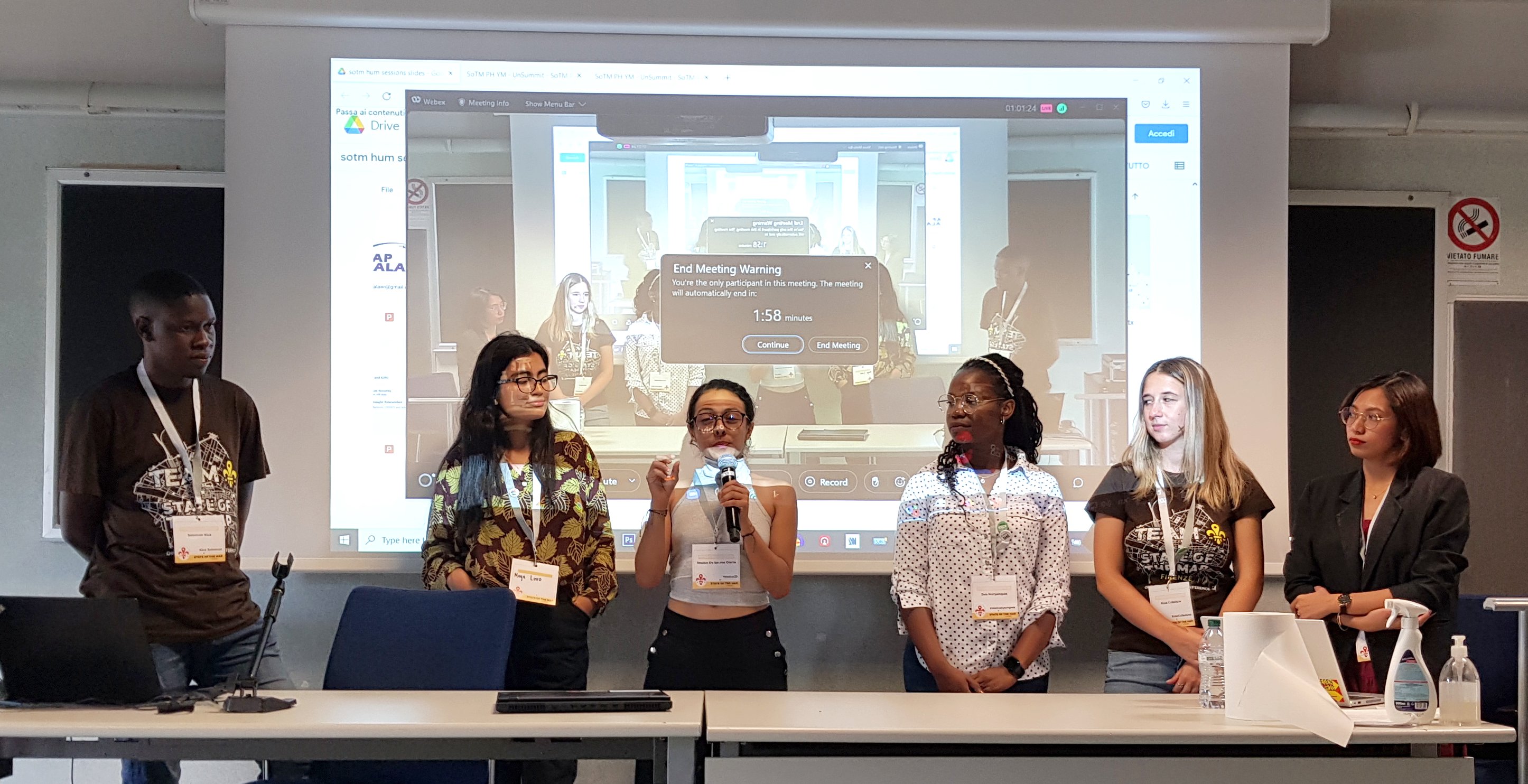
Inspired by Gustavo’s diary on his SotM experience, I am putting some of my thoughts down on paper…
This was only my second in-person State of the Map (first in Belgium) but it felt like I’d been many times - people were so welcoming and open, the organisation and volunteers were great and there were a lot of familiar faces (and usernames).
On Friday my main track highlights were Martijn on 10 years of MapRoulette and Kristen on Entry Level Mobile Mapping.
On the Friday afternoon (also World Humanitarian Day), I hosted the HOT unSummit Humanitarian sessions (which you can watch again here) and we heard fantastic stories and insights and saw some great maps, data and tools from 12 different speakers, all relevant to humanitarian open mapping and from all corners of the world. Kudos to the speakers for being so well prepared and to the audience for being so engaged and curious. It was a really great afternoon.
Posted by marc__marc on 2 September 2022 in French (Français).
Post d’origine https://blog.openstreetmap.org/2022/06/02/announcement-data-model-study/
Vers un modèle de données amélioré pour OpenStreetMap
Nous connaissons et aimons tous le modèle de données OpenStreetMap avec ses nœuds, ses chemins et ses relations, ainsi que le balisage ouvert qui a permis à OpenStreetMap d’être si innovant. Mais le modèle de données a aussi ses années et certaines améliorations sont possibles. Il y a beaucoup de choses que nous ne voulons pas changer. En particulier, le modèle de balisage ouvert a fait ses preuves. Nous pourrions penser à de petites améliorations, mais l’idée de base, qui consiste à autoriser un nombre illimité de balises clé-valeur (chaîne de caractères), a très bien fonctionné.
Mais il y a quelques points sensibles dus à la façon dont nous organisons nos données. Le plus gros problème est que la localisation géographique n’est disponible que pour les nœuds et non pour les objets géographiques de plus haut niveau comme les chemins et les relations. Cela signifie que pour accéder à l’emplacement d’un chemin, par exemple, il faut toujours suivre les références aux nœuds membres de ce chemin. Cela rend le traitement des données OSM extrêmement lourd et gourmand en ressources. L’autre problème majeur souvent évoqué est l’absence du type de données “zone”. Nous utilisons des solutions de contournement comme les chemins fermés et les relations multipolygones, mais cela a toujours été problématique, car nous ne pouvons pas être sûrs que ces objets sont réellement des polygones valides.
utilsplugin
- must have plugin
- provides several useful tools for faster and more efficient editing in JOSM
- e.g. "Split objects" by pressing "Alt"+"x" as an alternative to the terracer plugin in case of more complex shapes
- more info: https://josm.openstreetmap.de/wiki/Help/Plugin/UtilsPlugin2
Buildings_tool
- must have plugin
- press "b" to activate the plugin
- rectangular buildings can be created with just two mouse clicks if another object is selected as guide for orientation
- if no other object is selected, three mouse clicks are required
- tag "building=yes" is inserted automatically
- pressing "CTRL" deactives auto-snapping. This is required to avoid that the new building has shared nodes with highways
- choosing a node of an existing building as first node offers the possibility to align the new building to the one already existing.
- more information: osm.wiki/JOSM/Plugins/BuildingsTools
HouseNumberTaggingTool
- used to assign house numbers to ways or nodes
- simply select an object and press "k" on the keyboard to open a window with common address keys
- if (downloaded) objects in the vicinity have already assigned keys like "addr:street" or "addr:postcode" these values can be easily selection from a drop-down list. This avoids false edits.
- tool allows to automatically apply increments to house numbers every time a new house number is assigned (increment slider at the bottom of the window)
- more info: https://josm.openstreetmap.de/wiki/Help/Plugin/HouseNumberTaggingTool
Terracer
Toutjava Map
Posted by Gustavo22Soares on 31 August 2022 in English.
