OpenStreetMap
andrewwiseman's Comments
| Changeset | When | Comment |
|---|---|---|
| 61545285 | over 7 years ago | Looks great, thanks for mapping! |
| 61545506 | over 7 years ago | Thanks for mapping! don't forget to square the corners of your buildings though, they should be 90 degrees. You can do that by clicking the s key on your keyboard. Thanks! |
| 61531163 | over 7 years ago | Thanks for mapping! don't forget to square the corners of your buildings though, they should be 90 degrees. Do that by clicking the s key on your keyboard. Thanks! |
| 61545522 | over 7 years ago | Thanks for mapping, looks great! Keep it up! |
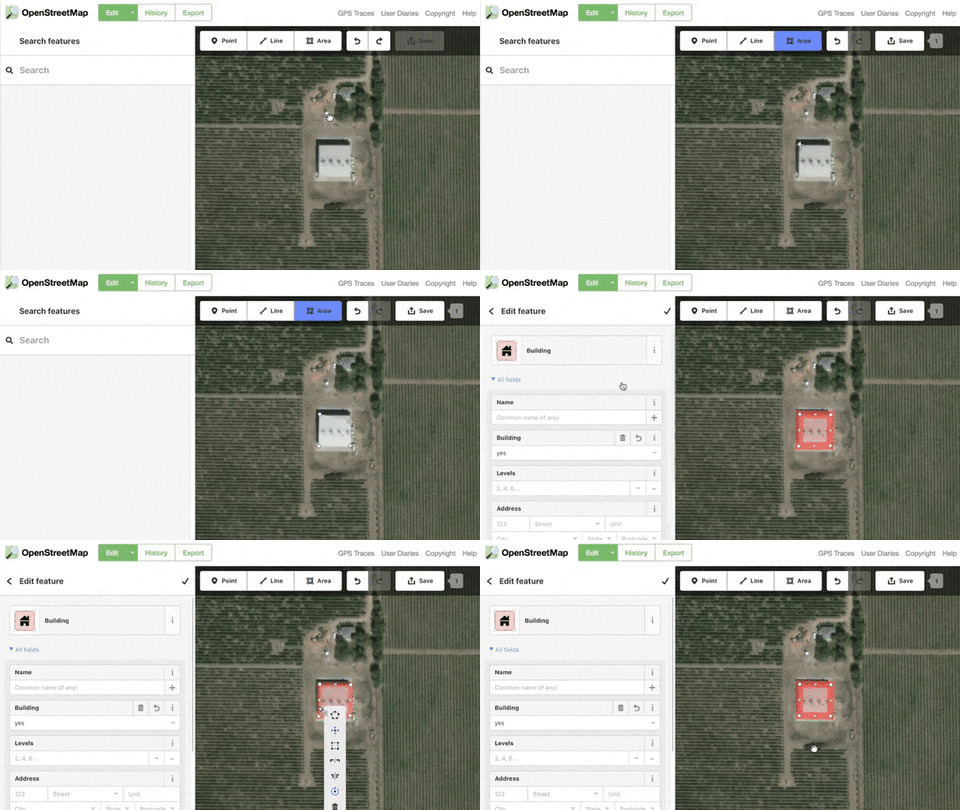
| 61540598 | over 7 years ago | Thanks for mapping! Don't forget to square the corners of your buildings, they should almost always be 90 degrees. To do that click on the building and click the s key on your keyboard. Here's a gif that shows what it looks like https://media.giphy.com/media/9V3I96bqVZ0K9BKZsq/giphy.gif
|
| 61540657 | over 7 years ago | Thanks for mapping! Don't forget to square the corners of your buildings, they should almost always be 90 degrees. To do that click on the building and click the s key on your keyboard. Here's a gif that shows what it looks like https://media.giphy.com/media/9V3I96bqVZ0K9BKZsq/giphy.gif
|
| 61540711 | over 7 years ago | Thanks for mapping! Don't forget to square the corners of your buildings, they should almost always be 90 degrees. To do that click on the building and click the s key on your keyboard. Here's a gif that shows what it looks like https://media.giphy.com/media/9V3I96bqVZ0K9BKZsq/giphy.gif
|
| 61540760 | over 7 years ago | Thanks for mapping! Don't forget to square the corners of your buildings, they should almost always be 90 degrees. To do that click on the building and click the s key on your keyboard. Here's a gif that shows what it looks like https://media.giphy.com/media/9V3I96bqVZ0K9BKZsq/giphy.gif
|
| 61540863 | over 7 years ago | Thanks for mapping! Don't forget to square the corners of your buildings, they should almost always be 90 degrees. To do that click on the building and click the s key on your keyboard. Here's a gif that shows what it looks like https://media.giphy.com/media/9V3I96bqVZ0K9BKZsq/giphy.gif
|
| 61541032 | over 7 years ago | Thanks for mapping! However don't forget to square the corners of your buildings by clicking the s key on your keyboard. Most buildings will be either square or rectangular and there are some crooked shapes here |
| 61541033 | over 7 years ago | Thanks for mapping! However don't forget to square the corners of your buildings by clicking the s key on your keyboard. Most buildings will be either square or rectangular and there are some crooked shapes here |
| 61541179 | over 7 years ago | Thanks for mapping! However don't forget to square the corners of your buildings by clicking the s key on your keyboard. Most buildings will be either square or rectangular and there are some crooked shapes here |
| 61541256 | over 7 years ago | Thanks for mapping! However don't forget to square the corners of your buildings by clicking the s key on your keyboard. Most buildings will be either square or rectangular and there are some funny crooked shapes here |
| 61541306 | over 7 years ago | Thanks for mapping! However don't forget to square the corners of your buildings by clicking the s key on your keyboard. Most buildings will be either square or rectangular and there are some crooked shapes here |
| 61541320 | over 7 years ago | Thanks for mapping! However don't forget to square the corners of your buildings by clicking the s key on your keyboard. Most buildings will be either square or rectangular and there are some funny crooked shapes here |
| 61541370 | over 7 years ago | Thanks for mapping! However don't forget to square the corners of your buildings by clicking the s key on your keyboard. Most buildings will be either square or rectangular and there are some funny crooked shapes here |
| 61542721 | over 7 years ago | Looks great! Thanks for mapping |
| 61543219 | over 7 years ago | Thanks for mapping! However don't forget to square the corners of your buildings by clicking the s key on your keyboard. Most buildings will be either square or rectangular or L-shaped and there are some funny crooked angles here |
| 61543253 | over 7 years ago | Thanks for mapping! However don't forget to square the corners of your buildings by clicking the s key on your keyboard. Most buildings will be either square or rectangular and there are some funny crooked shapes here |
| 61543751 | over 7 years ago | Thanks for mapping! Looks great, please keep mapping! |