
I often see Nordic pistes on top of already existing way. This is not appreciated. I found a very good tutorial here: https://www.opensnowmap.org/iframes/how-to-eng.html
It adds examples to the “official” docu from here: piste:type=nordic
 OpenStreetMap
I often see Nordic pistes on top of already existing way. This is not appreciated. I found a very good tutorial here: https://www.opensnowmap.org/iframes/how-to-eng.html
It adds examples to the “official” docu from here: piste:type=nordic
making minor changes to boundary adjustment
To to
C’est passé à 30km/h autour de chez moi depuis début janvier, en particulier visible par le marquage des rues à 50 km/heure (les autres étant par défaut à 30 je suppose, je n’ai pas encore trouvé de source expliquant cela).
Avant de passer à une modification plus vaste et automatique (voir par exemple ici), j’ai modifié ma petite zone de confort en sélectionnant à la main les diverses rues concernées, les rues concernées autour de chez moi sont seulement des residential et des secondary, donc assez simple à filtrer dans JOSM.
Ensuite 1 petit tour sur le rendu cyclosm.
C’est un bon moyen de voir les erreurs, comme par exemple : - j’avais filtré les rues ayant déjà des “maxspeed=*” / or il y avait un maxspeed erroné sur une des rues - j’avais raté la sélection à la main d’une des rues, idem cela saute à l’oeil,
Avant de m’attaquer à l’édition plus large et pour avoir une source supplémentaire concernant les rues à 50, j’ai fait une demande de données à la plateforme OpenData.
À suivre
PS : ceci est mon premier billet de journal, juste pour témoigner de petits moments de contribution :)
A recent id-tagging-schema pull request introduces presets specific to Germany that would make it easier for mappers there to tag schools by type based on locally understood terminology. It’s a great idea, one that hopefully will be extended to other countries like the United States in due time. Some Americans will see a “Kindergarten” preset and intuitively expect a complementary “Elementary School” preset too.
School type presets wouldn’t just be a matter of convenience to mappers. Local maps of the U.S. conventionally distinguish between different types of schools, namely between elementary schools, middle schools, high schools, and colleges and universities. I’d like to eventually see OpenStreetMap-based maps that make the same distinctions.

School classification has long been a tricky subject in OSM. There are at least three documented, machine-readable schemes for classifying schools:
(wird in Kürze geschrieben)
Určené najmä známym jedného zanieteného turistu, ktorý sa príliš nevyzná v podrobnostiach.
Ide o mapový projekt, ktorý pokrýva celý svet - tvorený bežnými ľuďmi alebo firmami podľa svojich potrieb alebo záujmov.
Mapové údaje obsahujú informácie o jednotlivých prvkoch. Napríklad prameň pod sedlom Lúčky obsahuje číslo objektu, súradnice a jeho parametre natural=spring, refitted=yes a odkaz na jeho fotografiu. Tie parametre znamenajú, že ide o prameň a bol upravený človekom (strieška, korýtko atď.)
Tieto mapové údaje si môže každý stiahnuť a s dostatočnými znalosťami vykresliť podľa svojich potrieb.
Freemap je jednou z možností, ako vykreslovať jednotlivé mapové údaje z Openstreetmap. V našom prípade zamerané najmä pre turistov na Slovensku.
Takže vyššie spomenutý prameň nájdeme aj vo Freemap ale zakreslený nielen krúžkom, ale aj s chvostíkom, ako sme zvyknutý z klasických papierových máp. A doplnený strieškou, čo znamená, že prameň je upravený.
Osmand je ďalšou z možností, ako tieto údaje vykreslovať, tentokrát však ako aplikácia pre smartfóny a bez nutnosti hľadať internet v prírode.
Osmand je dostupný cez Google obchod v bezplatnej verzii (skromnému turistovi postačuje) alebo v platenej verzii s neobmedzeným počtom sťahovaní a ďalšími funkciami navyše.
Vhodné je doinštalovať aj doplnok, ktorý doplní aplikáciu o možnosť stiahnutia vrstevníc resp. tieňovania. Ten je však v obchode dostupný asi len v platenej verzii - takže najprv vyskúšajte Osmand, či bude vyhovovať a potom kupujte.
V aplikácii si stiahnite mapu Slovenska (označená názvom Štandardné mapy), v iných krajinách je možnosť stiahnuť aj len vybraný región (Česko > Moravsko-sliezsko, Poľsko > Sliezske vojvodstvo a pod.), keďže stiahnutie kompletných máp Česka a Poľska na občasnú turistiku napríklad v okolí Čierneho pri Čadci môže zabrať zbytočne veľa pamäte.
As every quarter I’ve updated the contributor statistics in the OSM wiki. The most notable effect is the drop off in new contributors in the 2nd half of 2021, which can at least partly be attributed to the demise of maps.me as a source of new mappers.
This is more obvious when you consider just the new users from this source
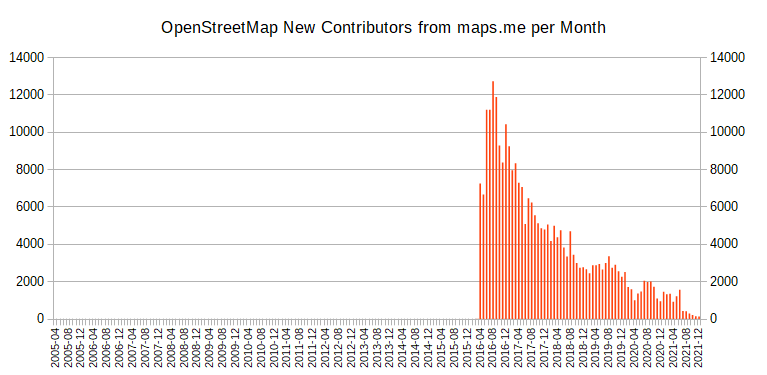
Note that the numbers include new users using organic maps, but even that doesn’t change the trend.
See my diary posts from 2020, 2018 and 2017 for more on the topic.
I’m really enjoying contributing to OSM so far.
I’m learning JOSM and adding a lot of data in Alexandria VA. Mainly creating row homes and now adding streets, city and zipcode to houses.
I add house numbers via Street Complete.
I also started a next door group. Hopefully others join! There’s a lot to do.
osm.wiki/Editor_usage_stats has some interesting parts for 2021
Removing private trail from map I am attempting to update the map to remove an area listed as a trail that is not a trail and on private property. My hope is that no one will use that non-trail. I made the changes but not sure how to save them to the actual map..
Dzięki pracy naszych kolegów Tomasza Tarasia oraz Maćka Bandurskiego pod adresem https://aed.openstreetmap.org.pl uruchomiliśmy stronę, która wyświetla wszystkie lokalizacje AED na terenie Polski znajdujące się w zasobach OpenStreetMap. Dane te są również dostępne bezpośrednio do pobrania w pliku CSV pod adresem: https://aed.openstreetmap.org.pl/aed_poland.csv oraz jako geojeson: https://aed.openstreetmap.org.pl/aed_poland.geojson
Wszystkie osoby posiadające konto w systemie OpenStreetMap mogą na stronie dodać do mapy takie urządzenie, korzystając ze specjalnego formularza oraz uzupełnić dane już wprowadzonych bez konieczności używania dodatkowych edytorów.
Zachęcam wszystkich edytorów, by w swojej okolicy sprawdzili czy takie urządzenia są dostępne i czy są już wprowadzone do OpenStreetMap. Informacja o ich lokalizacji może uratować czyjeś życie. Wszystkich, którzy chcieliby nam pomóc w tym projekcie zapraszam do kontaktu mailowego na adres: [email protected]
Dokładny schemat mapowania urządzeń można znaleźć na wiki
Hi
I am going to put this on hold, until I read more of the manual, and see what else I can pull in besides wikidata. Much preferred would be Placekey and Postal lookup information to authenticate the individual effort - no commercial, proprietary information, each building is researched and is within walking - driving distance to me.
ขนมจีนแม่เฒ่า
Yet another mess in Mogadishu.
The city was extensively mapped; buildings are very dense, though not every single building was added yet.
But someone opened H.O.T. tasks asking (to work in a extremely dense area) for Beginner Mapper.
Is this good for OpenStreetMap? NO, definitely
Is it good for OpenStreetMap map a soccer field 103 x 60 m (with the goals clearly visibles) as a building? NO, definitely
Who’d validate this way/1013314708 103 x 60m building?
If anyone is following my mapping work, they’ll know that I started a tutorial series on YouTube about a year ago, in which I focus on heritage mapping, because that’s what interests me most (even if I map way more ordinary buildings during our #osmIRL_buildings campaign than I map heritage). Between Christmas and the New Year 2022, I had been wrecking my brain about what else to do tutorials about, because I thought that I had covered most things. Then I came across a Heritage Trail in County Tipperary - the Derrynaflan Trail* - and decided to take that as an example for a new tutorial series. So, I will walk along the trail described here and focus on different mapping aspects. This will give me the opportunity to talk about tags that are not necessarily heritage related, but useful for people along the trail, i.e. amenities like car parks, public toilets, EV charging points, accommodation, restaurants etc.
Luckily, the trail is only about an hour’s drive away, so even though I happen to have visited quite a few of the sites already, I might go there again for some image material and micro mapping quests. I’m also hoping to add some more photographs to WikiCommons, because this part of the country is rarely visited by foreign tourists who happen to be contributing more than the locals to WikiCommons, unfortunately.
In the first episode, I created a multipolygon relation for the trail and added the first building to it.
*The Derrynaflan Trail is named after a church site where a very famous early Christian hoard was found which is now housed in the National Museum in Dublin (I might do an episode visiting it).
Please feel free to watch along and contribute with ideas about what else to focus on in future episodes!
In December of 2021 a bi-annual International Cartographic Conference was held in Florence, Italy.

Because of Covid it was a mixed conference, however ~200 people (my estimation, I do not have an official number) have attended on site (with many more participating on-line).
OpenStreetMap was mentioned a lot. This is a good thing, but… the only good thing. It was always mentioned just as a data source. And it seems everybody is taking for granted that OSM data while being heterogenic in saturation is at least in schema (tagging) a consistent thing and slowly smartly evolving, rather than eroding. Nobody new or even expected that schema in OSM can be changed by anybody, even people who have absolutely no clue in Cartography/GIS. And this is not only a possibility, but a reality.
This diary post is inspired by the cleaning up after a task manager task. It shows how to do the clean-up steps for a Divide and map. Now. area.
The data quality matters. The proposal in the Johnwhelan ‘s diary is to run duplicated building script and JOSM validator when an area is finished on the whole area. The rest of his diary deals with how to get the area’s border geometry and the OpenStreetMap data into the JOSM.
Here are the steps to download the area’s geometry and the OpenStreetMap data when using the damn project:
Load the area’s geometry by navigating to the area in the JOSM damn plugin, then click Get area geometry button.
It’s also possible to navigate to the area in the mappy (web) client, right click on arbitrary square and download area geojson, and open the downloaded file in the JOSM. It’s good idea to right click on the created area.geojson layer and Convert to GPX layer to make it read-only, which is the same result as when using the JOSM damn plugin.
Download the data from Overpass API, which is the second tab on Download map data … dialog. You can get the Overpass query by navigating to the area in the mappy (web) client, right click on arbitrary square and area overpass query. Then copy the query to the JOSM’s Download from Overpass API, Overpass query: field and click Download. Be sure you have enough RAM for big areas.
That’s all. It’s kind of fun I’m writing this diary just few days after my damn project developer’s “annual report”, but I didn’t make it sooner.



.png)


